
Browser startup lock review
Set password for your browser review: a startup password, but no relock
Version 9.1 asks for a password when Chrome starts. Once unlocked, it does not lock again when you step away. It also does not encrypt your saved Chrome profile.
Reviewed: Set password for your browser ( chrome lock ), version 9.1, by eswar yaga. Extension ID: cjmjgijhapgicbhmniemjkjeaedanank. Its store description promises a password prompt when Chrome starts, not encryption of the profile. This review asks whether that mechanism protects your browser data from someone using your unlocked computer.
On this page
Who are you protecting the browser from?
Someone else sits down at your computer while you are still signed in to it. They do not know the startup password. What can they open?
- They try to use Chrome normally. The startup password page can block ordinary browsing while its lock is active.
- They try Chrome's extension controls. Normal foreground attempts to open extension management were blocked in the active-lock run.
- They use additional tools from the same computer account. The successful disable/removal tests used browser debugging; a separate internal-unlock run also required debugging access to the extension page.
What the password actually controls
- Save the open pages: at Chrome startup, the extension records the URLs and positions of open tabs, then asks Chrome to close them.
- Show the password page: it opens its own password tab and tries to keep other browsing windows from being used.
- Reopen after the correct password: it compares the entered password with the saved value, then asks Chrome to reopen the saved URLs.
Reopening saved URLs is not decrypting the Chrome profile. Version 9.1 controls tabs and windows. It does not encrypt Chrome's saved history, cookies or passwords with the extension password.
Will it lock again when I step away?
No—not after you have successfully unlocked it. A startup-only lock does not cover handing over a browser that is already running and unlocked.
The trigger is chrome.runtime.onStartup, for profile startup. After successful unlock, version 9.1 has no idle relock, manual lock button or lock shortcut. Leaving an already-unlocked browser unattended does not start this workflow again. That missing relock is an implementation choice, not a restriction imposed on all extensions.
Does it keep the locked browser out of sight?
No. The password screen remains visible. It blocks ordinary browsing behind the prompt, but it does not hide that Chrome is locked.
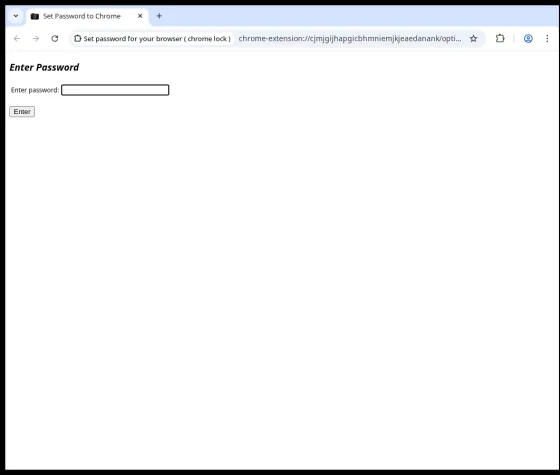
A visible lock and keeping a private space out of sight are separate requirements.
What happens if the extension is disabled or removed?
With browser debugging enabled beforehand, version 9.1 was removed while its password page was active, without entering its password. After a normal restart, the extension was gone and the site was still signed in.
Normal attempts to open Chrome's extension manager from the locked browser were blocked. The successful removal used the already-enabled debugger to reach Chrome extension management, followed by Chrome's standard Remove dialog.
| Action from an active lock | Observed result |
|---|---|
| Navigate the password page to Chrome's extension manager | Blocked. The password tab closed before the manager could be used. |
| Open the extension manager in a new foreground tab | Blocked. The active lock closed the foreground window. |
| Disable from debugger-assisted Chrome management | Disabled. Chrome reported the extension disabled without the extension password; the saved state was accessible. |
| Reach Chrome's extension-management UI with debugger access and remove the extension | Removed. Chrome showed its standard Remove dialog; the extension remained absent after a normal restart. |
| Open the saved verification state after restart | Accessible. The site was still signed in after restart without the extension password. |
How the disable/remove check was run
The completed user-modifiable removal run used Chromium 144.0.7559.96 on Debian GNU/Linux 13 with the exact 9.1 CRX installed under its production extension ID. The password was set through the extension setup UI, a signed-in state was created, and the browser was restarted until the normal startup password page was active.
Foreground management attempts were exercised while that page was active. The completed removal used an already-enabled debugger connection to reach Chrome extension management, followed by Chrome's standard Remove dialog. No extension password was submitted for the removal.
Chrome can impose separate enterprise policy that prevents users from modifying an extension. That administrative boundary comes from Chrome management, not from this extension password.
What does the startup password protect if the extension is not running?
Nothing extra in the saved Chrome profile. Version 9.1 does not encrypt Chrome's history, cookies or saved passwords with its password. Chrome and the operating system may still protect particular secrets in their own ways, but those protections do not come from this extension.
This does not mean every Chrome secret is plain text or that copying encrypted bytes reveals their contents. Chrome and the OS may separately protect particular secrets. For example, Chrome introduced App-Bound Encryption on Windows beginning with cookies in Chrome 127. Those protections are independent of this extension.
The browser checks used a history entry, saved site data and a login cookie. They establish what happened to those saved items; extracting saved passwords or reusing account cookies is a different question.
Would fixing every bug make its password protect the saved profile?
No—not by fixing the password screen alone. Fixes can make the startup lock more reliable, but protecting the saved profile after the extension stops requires a separate mechanism that protects the data itself.
| Improvement | What it fixes | What it does not add by itself |
|---|---|---|
| Reliable startup locking | Consistent enforcement of the startup workflow. | Protection for profile contents outside that workflow. |
| Modern password storage and authorization checks | Protection for the extension's own credentials and control operations. | Encryption of history, cookies and other profile data. |
| Automatic idle locking | A barrier when someone returns to an unattended browser. | Protection that remains independent of the running extension. |
| Encryption of its saved tab list | Confidentiality of that copy of tab metadata. | Encryption of the rest of the Chrome profile. |
An extension can be part of a larger system that protects browser data with a separate native app or encryption layer. Version 9.1 does not do that here: it controls Chrome windows and tabs. Making its password protect the saved profile would require a different data-protection layer, not just a better startup prompt.
Will I still be signed in after the startup password prompt?
The site stayed signed in after restarting the browser and entering the startup password. We returned to it without signing in again, and its saved site data was still present.
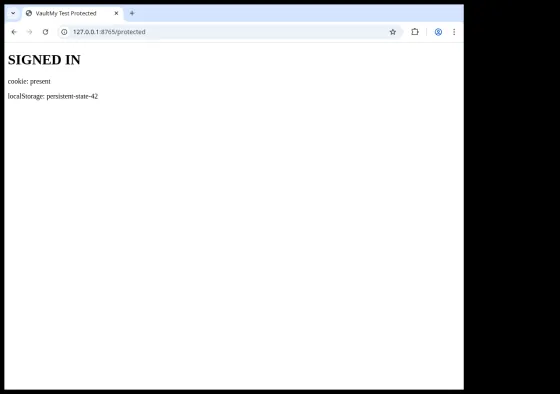
What happens to open tabs? The extension snapshot contains URLs, window IDs and tab indices. It is not a backup of live page memory or unsaved form state. There is also no relock after successful unlock.
How this sign-in check was run
This persistence check was run September 25, 2026 with the fingerprinted 9.1 CRX in an isolated Chromium 144.0.7559.96 profile on Debian GNU/Linux 13. The site set a 24-hour session cookie and a saved site value in localStorage.
Coverage: one local cookie-based login and one localStorage value. This Linux/Chromium persistence run is separate from the Windows 11 security experiments in the evidence section.
Need to keep your accounts signed in on a shared computer?
If you need to keep accounts signed in while keeping other people out, compare browser-protection options for a shared computer.
If the space itself must stay out of ordinary view, see locking a profile versus hiding its existence.
Other weaknesses in version 9.1
The following are additional weaknesses in this version.
The password is stored as plain text
The extension stores the password itself, not a hash. Setup writes the password directly to chrome.storage.local, and unlock compares what you enter with that saved string. Anyone who can read that stored value gets the password without guessing it. Ordinary websites do not receive this extension-storage value.
Setup overwrites an existing password without verifying it
The setup code can replace an existing password without asking for the current one. If the two new entries match and are not empty, it saves the new string. The field named old is not actually checked against the old password. This finding is about the setup handler itself; the active-lock removal path above did not depend on this setup page.
The installation handler also opens setup on update events because it ignores the event reason. Opening the page alone does not change the password; submitting it does.
Can the lock be switched off without entering the password?
With debugging access to the extension's own password page, the internal command that turns off the lock worked without entering the password. The password tab closed and normal browsing became possible.
This path requires debugging access to the extension page. The package does not expose that command to ordinary websites.
The lock did not come back after its background process restarted
After we deliberately stopped and restarted the extension's background process using debugging tools, the lock did not come back. Normal tabs and the saved browser state were accessible while the extension itself was still installed.
In two separate observations, the background process also stopped on its own about 30 seconds after debugging detached. In one run, opening a normal tab started a fresh background process but did not restore the lock. That timing is not a rule or a guaranteed waiting period.
Stopping the background process is different from disabling the extension. Chrome is allowed to stop and restart extension workers, so a reliable lock has to restore the state it needs when that happens.
Evidence and limits of the review
| Evidence item | Identification |
|---|---|
| Package | Version 9.1; downloaded directly from Google on September 19, 2026 |
| CRX SHA-256 | 217df937c8aeca8d9a68b328745986456e6efa54b680f8b83fe1f5e4cdac34a4 |
| Browser and OS | Chrome for Testing 153.0.8010.52, headless; Windows 11 25H2, build 26200.9457 |
| Privileges and installation | Security experiments: non-elevated isolated profile with the original extracted package. Completed removal check: user-modifiable production-ID install in Chromium 144 on Debian 13. |
| Automation | CDP for the security experiments and completed management checks; Chrome's standard confirmation dialog performed the final user-installed removal. |
| Question | How the lock was started |
|---|---|
| Windows security and worker checks | The original startup handler was triggered through CDP, then the password page and active lock listeners were verified before each check. |
| Sign-in persistence | The password was set through the extension UI; a normal browser restart produced the startup password page. |
| Removal while locked | The normal startup password page was active; browser debugging was already enabled to reach Chrome extension management, and Chrome's standard Remove dialog performed the removal. |
Google package download. Future downloads may differ; compare the manifest and fingerprint. HTTPS provenance was checked; the CRX signature was not independently verified.
All ten package files were read, including all three JavaScript files, both HTML entry pages and the manifest. The absence of profile encryption and independent access control follows from tracing all executable paths, not just from searching for permission names. Initial Node-based checks used mocked APIs to verify control flow; the browser experiments subsequently exercised the original scripts with non-sensitive data.
The browser experiments establish the stated behavior with active enforcement, the listed same-user capabilities and saved profile state. The completed production-ID management run covers foreground blocking, debugger-assisted disable/removal and the next normal restart. Claims about saved-password extraction, arbitrary websites, incognito behavior or universal tab restoration are outside these findings.
Technical evidence — startup, restoration and password comparison
For what the URL snapshot does and does not restore, see signed-in state and reopened tabs. The extracts below show the stored fields and restoration request.
The following are exact extracts from the downloaded package, formatted with Prettier 3.6.2 using its Babel parser and defaults. Captions identify one-based formatted line numbers. Separate extracts omit intervening code; identifiers and statements are unchanged.
chrome.runtime.onStartup.addListener(async function () {
  chrome.storage.local.get(["key"], (result) => {
    //console.log('Value retrieved:', result.key);
    if (result.key) {
      closeAllTabs();
closedTabs = tabs
  .filter((tab) => tab.url !== chrome.runtime.getURL("options-1.html"))
  .filter((tab) => tab.url !== chrome.runtime.getURL("options.html"))
  .map((tab) => ({
    url: tab.url,
    windowId: tab.windowId,
    index: tab.index,
  }));
function save_options() {
  chrome.storage.local.get(["key"], (result) => {
    //console.log('Value retrieved:', result.key);
    var actual = result.key;
    var entered = document.getElementById("old").value;

    if (entered == actual) {
      chrome.runtime.sendMessage({ action: "removeListener" }, (response) => {
        if (response.success) {
          //console.log("Listener removed successfully.");
        }
      });
Code excerpts — password storage, setup and background authorization
These extracts use the same package and formatting as the mechanism evidence. Initial isolated checks used mocked DOM/Chrome objects. The browser experiments described above subsequently exercised the original scripts with real Chrome APIs and non-sensitive data.
if (old == "" || newPassVal == "") {
  document.getElementById("note").style.display = "block";
  document.getElementById("note").innerHTML = "enter both fields";
} else if (newPassVal == old) {
  chrome.storage.local.set({ key: newPassVal }, () => {});
  document.getElementById("note").innerHTML = "password saved";
  document.getElementById("old").value = "";
  document.getElementById("new").value = "";
  document.getElementById("save").style.display = "none";
chrome.runtime.onMessage.addListener((message, sender, sendResponse) => {
  if (message.action === "removeListener") {
    if (activeListener) {
      reopenClosedTabs();
      chrome.tabs.onActivated.removeListener(activeListener);
      chrome.tabs.onUpdated.removeListener(onTabUpdated);
      //console.log('Listener removed');
      activeListener = null; // Clear the reference after removing
    }
    sendResponse({ success: true });
  }
});