
Browser Lock security review
Browser Lock review: does it password-protect your Chrome profile?
Browser Lock 2.0.4 puts a password screen in front of Chrome, but does not encrypt your saved Chrome profile. Reopening the same profile with extensions disabled bypassed the lock and left the site signed in.
This review examines Browser Lock | Lock Your Browser 2.0.4, from browserlock.io. The package and evidence identify the exact extension and build.
The Chrome Web Store description promises that “all your data, from saved passwords to browsing history, is securely encrypted.” This review checks whether Browser Lock actually implements that protection.
On this page
What does its password protect?
Browser Lock 2.0.4 can stop ordinary use of Chrome while its lock is running. Its password does not encrypt your saved Chrome profile. Reopening the same profile with extensions disabled bypassed the lock: Browser Lock did not run, and the site was still signed in without entering its password.
Who are you protecting the browser from?
Someone else sits down at your computer while you are still signed in to it. They do not know the Browser Lock password. What can they open?
- They try to use Chrome normally. Browser Lock can put its password screen in front of windows and tabs while the lock is active.
- They try Chrome's extension controls. A normal foreground attempt was blocked while the lock was active.
- They use additional tools from the same computer account. Relaunching the same profile with extensions disabled bypassed Browser Lock. A separate removal run used browser debugging to reach Chrome extension management.
What the password actually controls
When you lock Chrome, Browser Lock saves a list of open tabs, closes the browsing windows and opens its password screen. After the correct password, it opens the saved pages again. It does not encrypt your Chrome profile during that process.
Browser Lock can lock at startup, from a shortcut or menu, and after a configured idle period. Those options help when you step away from an unlocked browser. They do not make the Browser Lock password necessary for opening the saved Chrome profile if Browser Lock itself is not running.
The technical storage and window-control details are in the evidence section.
Does it keep the locked browser out of sight?
No. The password screen remains visible. It blocks the pages from ordinary view, but it does not hide that Chrome is locked.
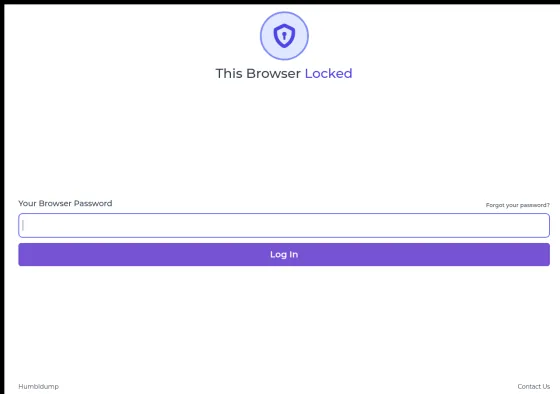
A visible lock and keeping a private space out of sight are separate requirements.
What happens if the extension is disabled or removed?
Reopening the same profile with extensions disabled bypassed Browser Lock without entering its password. Browser Lock did not run, and the site was still signed in. Separately, with browser debugging already enabled, Chrome removed Browser Lock while its lock screen was active; after restart, the extension was gone and the site was still signed in.
A normal attempt to open Chrome's extension manager while Browser Lock was active was blocked. The successful removal run used the already-enabled debugger to reach Chrome's extension-management page, then Chrome's standard Remove dialog performed the removal.
| Action from or around an active lock | Observed result |
|---|---|
| Open a foreground extension-manager or ordinary site tab | Blocked. Browser Lock closed the foreground tab/window. |
| Close Chromium and relaunch the same profile with extensions disabled | Bypassed. Browser Lock did not load; the site was still signed in without its password. |
| Reach Chrome's extension-management UI with debugger access and remove Browser Lock | Removed. Chrome showed its standard Remove dialog and the extension was absent immediately afterward. After restart, the saved profile opened without a Browser Lock password. |
| Open the saved session after removal | Accessible. The site was still signed in after the extension was removed. |
How the disable/remove check was run
The same-profile extensions-disabled and completed removal runs used Chromium 144.0.7559.96 on Debian GNU/Linux 13 with the production extension ID and saved browser state. Browser Lock onboarding depends on its external registration service, so a valid registered state and password verifier were seeded in the extension storage before exercising the real lock UI.
The extensions-disabled run used Chromium's --disable-extensions launch option. The removal run began on Browser Lock's actual #/pwd lock screen; an already-enabled debugger connection navigated that renderer to Chrome extension management, where Chrome's standard confirmation dialog performed the removal. No Browser Lock password was entered in either path.
Chrome can impose separate enterprise policy that prevents users from disabling or removing extensions. That administrative boundary comes from Chrome management, not from the Browser Lock password.
What does the Browser Lock password protect if Browser Lock is not running?
Nothing extra in the saved Chrome profile. Chrome and the operating system do not use the Browser Lock password when opening Chrome's saved data. Chrome and the OS may still protect particular secrets in their own ways, but those protections do not come from Browser Lock.
For example, Chrome introduced App-Bound Encryption on Windows beginning with cookies in Chrome 127. The absence of an additional extension layer does not mean every browser secret is plain text, or that a copied cookie or password database can necessarily be decrypted or reused.
Would fixing every bug make its password protect the saved profile?
No—not by fixing the password screen alone. Fixes can make the lock more reliable, but protecting the saved profile after Browser Lock stops requires a separate mechanism that protects the data itself.
| Improvement | What it improves | What it does not add by itself |
|---|---|---|
| Reliable startup locking | Consistent enforcement of the browser-lock workflow. | Protection for profile contents outside that workflow. |
| Safer password storage and recovery | Protection for the extension's own credentials and control operations. | Encryption of history, cookies or saved passwords in Chrome's profile. |
| Automatic and manual locking | A barrier to ordinary use of an unattended browser. | Protection that persists independently of the extension's enforcement. |
| Encryption of the saved tab list | Confidentiality of that particular copy of tab metadata. | Encryption of the rest of Chrome's stored profile. |
An extension can be part of a larger system that protects browser data with a separate native app or encryption layer. Browser Lock 2.0.4 does not do that here: it controls Chrome windows and tabs. Making its password protect the saved profile would require a different data-protection layer, not just a better password screen.
Will I still be signed in after unlocking?
The site stayed signed in after locking and unlocking. Entering the correct password let us return to it without signing in again. Its saved site data was still present.
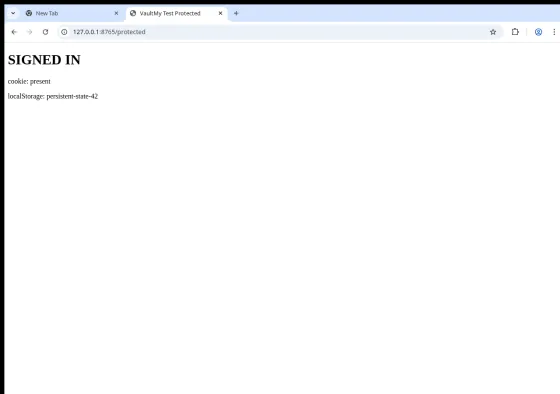
What happens to open tabs? Browser Lock reopens saved URLs, pinned tabs and tab groups in maximized windows. Pages load again rather than returning from live page memory, so unsaved form state is not part of the extension snapshot.
Check the settings for deleting data after wrong passwords. Browser Lock calls this Quarantine. Those deletion options were off during the sign-in check; turning them on can change what remains afterward. See the data-deletion finding.
How this sign-in check was run
Reviewed September 25, 2026 with the fingerprinted Browser Lock 2.0.4 CRX under its production extension ID in an isolated Chromium 144.0.7559.96 profile on Debian GNU/Linux 13. The site set a 24-hour session cookie and a saved site value in localStorage.
Coverage: one local cookie-based login and one localStorage value. Browser Lock's external registration service was not part of the run; a valid registered state and password verifier were seeded directly in extension storage.
Need to keep your accounts signed in on a shared computer?
If you need to keep accounts signed in while keeping other people out, compare browser-protection options for a shared computer.
If the space itself must stay out of ordinary view, see locking a profile versus hiding its existence.
Other weaknesses in version 2.0.4
The following are additional weaknesses in this version.
Normal password storage uses unsalted SHA-256
Someone who copies the saved password-check value can test password guesses outside the lock screen. Browser Lock stores an unsalted SHA-256 value for the password and compares new guesses with it.
There is no per-password salt or deliberately slow password-hashing step. A strong random password can still be difficult to guess, but Browser Lock adds no extra computational cost to each offline guess. OWASP recommends password-specific hashing such as Argon2id.
Email recovery stores a readable copy of the new password
The email-reset code saves a readable copy of the new password in extension storage. After a successful reset response, it writes the password text into browser_password.length, a field that normally contains a number. The same object also contains the SHA-256 password-check value.
This happens on the email-recovery path, not during initial setup or an ordinary password change. Reading the stored value still requires access to extension storage; this does not expose it to arbitrary websites.
We confirmed the storage write with a locally supplied successful reset response. That exercised the local reset branch and storage reducer, not the remote email-code verification service.
The normal recovery UI asks api.browserlock.io to send and check an email code, then changes the local password after a successful response. This finding is about what the extension stores after that successful response; it is not an email-code bypass.
After too many wrong passwords, Quarantine delays more attempts
After five wrong passwords, Browser Lock temporarily blocks more attempts for one minute by default. Its settings call this Quarantine. The counter and expiry live in extension state, so they do not slow guesses made against a copied password-check value outside the lock screen.
You can also enable deletion of selected browsing data during Quarantine. Deletion is off by default. Turning it on can change what remains when you return, but it does not encrypt data that survives or copies obtained earlier.
The settings include a saved-password deletion option, but Chrome 144 and later ignore the passwords flag in the browsingData API. That option must not be treated as protection for Chrome's saved passwords on those versions.
Code excerpts — password check and recovery storage
Exact extracts from the fingerprinted package, formatted with Prettier 3.6.2 using the Babel parser and default options. Captions give one-based lines in the formatted copies. Identifiers and statements are unchanged; separate extracts omit intervening code.
if (
  zm.SHA256(w).toString() !==
  ((x = e.security.browser_password) == null ? void 0 : x.password)
) {
  (y(n("popup.password_wrong")), m(""), t());
  return;
} else
  (o(qr.actions.clearQuarantine()),
    ab
      .unlockTheBrowser()
The following reset branch runs after the OTP API returns success. It stores the password string in length. The storage reducer below persists that field unchanged. Our isolated check supplied a local success response; it did not exercise or bypass the remote OTP service.
if (d.status) {
  const g = zm
    .SHA256(u.values.password_section.new_password)
    .toString();
  (s(
    qr.actions.updateSecurity({
      browser_password: {
        password: g,
        length: u.values.password_section.new_password,
        changed_at: Fn().unix(),
      },
    }),
  ),
updateSecurity: (e, t) => {
  const n = { ...e, security: { ...e.security, ...t.payload } };
  return (chrome.storage.local.set({ mainStorage: JSON.stringify(n) }), n);
},
Worker restart retained the lock state
Browser Lock keeps lock state and its tab snapshot in chrome.storage.session; its tab handler reloads that state before deciding whether to close a new tab. This avoids relying solely on worker-global variables, which disappear when a worker stops.
In the completed toolbar-lock run, an explicit CDP worker stop and restart preserved the locked state and enforcement. The worker received a new target ID, the new tab was closed, and a later attempt after the transition had settled was closed too. This run did not reproduce a persistent worker-stop bypass. It is not a guarantee about every timing, startup or crash scenario.
Session storage survives worker suspension but is cleared on extension disable, reload, update or browser restart. Correctly resuming the lock after worker suspension improves the browsing barrier; it does not make the extension password an independent requirement for accessing profile contents.
Runtime validation
The security-boundary experiments used a non-administrator Windows profile in Chrome for Testing 153.0.8010.52 with the distributed package loaded unpacked and its executable code unchanged. Separate September 25 management checks used Chromium 144.0.7559.96 on Debian GNU/Linux 13 with the production extension ID.
Each active-lock management case began with Browser Lock visibly locked. Foreground management navigation was blocked. Debugger-assisted management reached Chrome controls without submitting the extension password. The separate same-profile relaunch used Chromium's --disable-extensions option and required no debugger interaction with the lock.
The saved profile state consisted of a persistent cookie, a localStorage value and, in the Windows checks, a seeded history entry. It remained readable after the relevant disable/removal paths and after restart. These results concern those saved items; they are not a claim that every browser store or account uses the same persistence mechanism.
Vendor networking and real credentials were excluded from the experiments. Debugger-assisted removal and the command-line relaunch represent stronger same-user capabilities than ordinary foreground browsing; the article labels those capabilities where they matter.
Package and evidence
| Item | Value |
|---|---|
| Product | Browser Lock | Lock Your Browser — browserlock.io |
| Extension ID | nldijlfmoepgjkjhmdiiainkjgmpdnmj |
| Version | 2.0.4 |
| Downloaded | September 19, 2026, directly from Google’s extension update service |
| CRX SHA-256 | 2715f468d38e356ff853fee43db6abe973258801ebe7db49a5aa3e15888c556c |
Download the package from Google · Chrome Web Store listing. The download service may serve a newer version later; compare the manifest and SHA-256.
All nine JavaScript files were parsed. The review traces the manifest and module imports, locking and restoration, local and session storage, password setup and comparison, recovery, quarantine and network destinations. The 44-file package also contains a nested CRX; its nine JavaScript files are byte-for-byte identical to the outer files, and no entry point loads that archive.
Technical details — windows, session storage and code evidence
- Capture: the extension queries open windows, tabs and tab groups, including URLs and tab metadata.
- Lock: it creates its own password popup, saves the snapshot and lock state, then closes the captured tabs and windows.
- Enforce: its service worker watches new tabs and removes those outside the lock popup while locked. Startup, shortcut, menu and idle paths can trigger locking.
- Restore: after the normal screen accepts the password, the extension clears its locked state and recreates windows and tabs from saved URLs. Startup settings can instead select a new tab or chosen URL.
For the practical effects of closing and reopening pages, see signed-in state and reopened tabs. The storage and code evidence below explains that restoration path.
The snapshot is a JSON-serialized value under sessionStorage in chrome.storage.session. Chrome keeps this storage in memory and clears it on browser restart or extension reload, update or disable. It is not a durable backup. Anyone with access to that stored value can decode its metadata without the Browser Lock password. This describes the extension storage value, not the physical format of Chrome's profile files.
Exact extracts from the fingerprinted package, formatted with Prettier 3.6.2 using the Babel parser and default options. Captions give one-based lines in the formatted copies. Identifiers and statements are unchanged; separate extracts omit intervening code.
const { windows: n, tabs: r } = await bo.getOpenedTabs(),
  i = await Ar.open();
(s === "init" && (Pe.sessionStorage.lock.initial_locked = !0),
  (Pe.sessionStorage.lock = {
    ...Pe.sessionStorage.lock,
    auto_locked: !0,
    open_after: ["https://x.com"],
    locked: !0,
    locked_at: vn().unix(),
    locked_reason: s,
    stored_windows: n,
    popup: i,
  }),
  Pe.save(),
  await bo.closeTabs(r),
  await bo.closeWindows(n));
save: () =>
  new Promise((s, n) => {
    chrome.storage.session
      .set({ sessionStorage: JSON.stringify(Pe.sessionStorage) })
      .then(() => s(!0))
      .catch((r) => n(r));
  }),